Intro
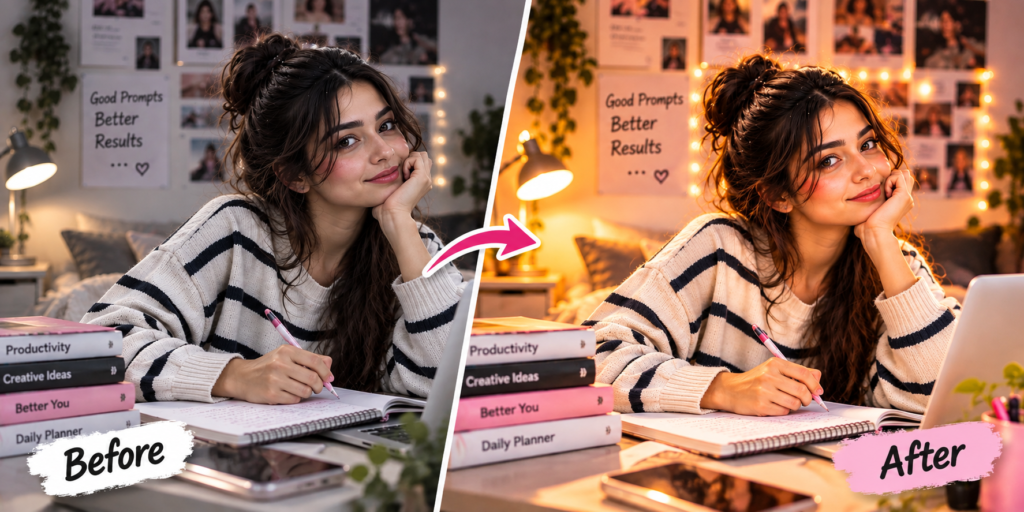
Create a realistic student lifestyle portrait with a laptop, notebook, cozy workspace, warm lighting and a focused study atmosphere.

AI Photo Prompt
Create a realistic study and laptop lifestyle portrait using the uploaded photo as the main reference. Keep the person’s face, identity and natural facial features unchanged. Place the subject at a cozy modern study desk with an open laptop, notebook, books and subtle workspace elements. Dress the subject in comfortable stylish casual clothing. Give the subject a natural focused pose while working or studying. Use warm indoor lighting, realistic skin texture, detailed desk objects, natural shadows and cinematic depth of field. Create a clean productive student lifestyle atmosphere with professional photography quality. Keep everything realistic and natural. Do not add any logo, website name, watermark, text or branding.
How to Create This Look
- Upload your portrait.
- Paste the study laptop prompt.
- Generate the image.
- Adjust the desk or background.
- Try different study poses.
What Makes This Prompt Work?
The laptop, notebook, books, warm lighting and focused pose create a realistic student lifestyle photography style.
Best Uses
Student profiles, Instagram, LinkedIn-style lifestyle content, study posts, Pinterest and educational social media.
Study Laptop Photo Prompt: Complete Guide
A study laptop photo prompt can transform an ordinary portrait into a realistic student lifestyle photograph. AI editing allows you to create a complete study environment with a laptop, notebook, books, desk accessories and warm indoor lighting.
This prompt focuses on creating a natural and productive workspace while keeping the person’s original identity recognizable. The combination of a laptop, notebook and focused pose helps communicate a genuine study atmosphere.
To use the prompt, upload a clear portrait to an AI image editing tool and paste the complete instructions. You can customize the workspace according to your preferred style. For example, you can create a minimal desk, a cozy bedroom study area, a modern library or a professional workspace.
Lighting is important for this type of image. Warm indoor lighting can create a comfortable environment, while natural daylight can make the image brighter and more realistic. Keeping shadows consistent with the environment can also improve the final result.
The study laptop photo prompt is useful for student social-media posts, study content, Pinterest images, profile pictures and creative lifestyle photography. You can experiment with different outfits, desk arrangements and poses.
For a professional-looking result, avoid overcrowding the desk with unnecessary objects. A clean workspace with a few realistic study elements often produces a more visually appealing image.
FAQs
Q1. Can I use my own photo?
Yes.
Q2. Can I change the laptop or desk setup?
Yes.
Q3. Can I create a library study scene?
Yes, simply change the environment in the prompt.