Intro
Create a realistic and stylish selfie with natural skin texture, cozy surroundings, flattering lighting and a modern social-media aesthetic.
AI Photo Prompt
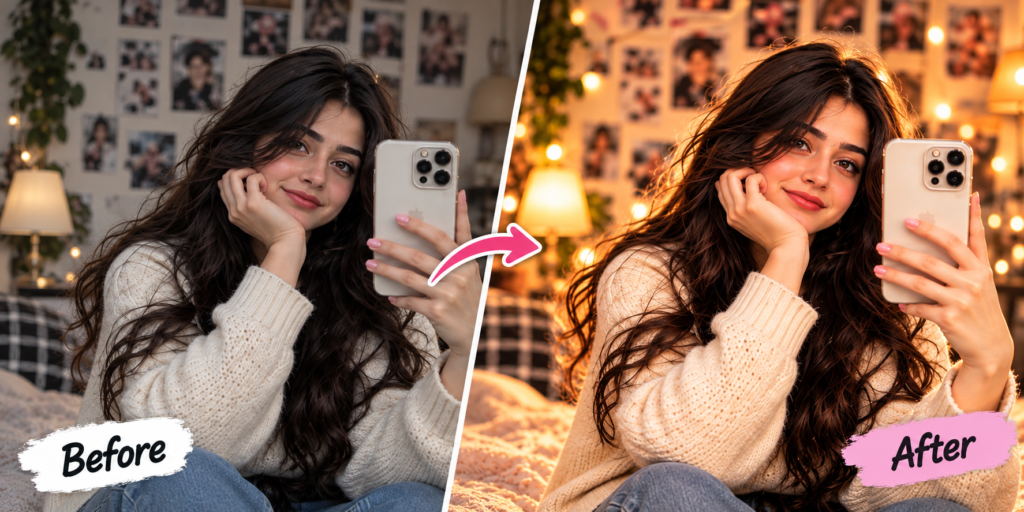
Create a realistic stylish selfie portrait using the uploaded photo as the main reference. Keep the person’s face, identity and facial features unchanged. Place the subject in a cozy modern indoor environment with warm natural lighting and subtle background details. Give the subject a relaxed natural expression and realistic selfie pose while holding a smartphone. Maintain authentic skin texture, realistic hair, natural facial proportions and subtle depth of field. Add soft cinematic lighting and a premium social-media photography effect without making the image look artificial. Keep the final image sharp and realistic. Do not add any logo, website name, watermark, text or branding.
How to Create This Selfie Look
- Select a clear selfie or portrait.
- Upload it to the AI editor.
- Paste the prompt.
- Generate the result.
- Adjust the background or lighting if required.
What Makes This Prompt Work?
Natural skin, realistic facial proportions, smartphone positioning and soft indoor lighting help create a believable modern selfie.
Best Uses
Instagram, profile pictures, social media, Pinterest and personal photo editing.
Selfie Portrait Prompt: Complete Guide
A selfie portrait prompt can help turn an ordinary selfie into a polished and stylish social-media photograph. AI photo editing can improve the environment, lighting and overall photography style while maintaining the person’s original facial identity.
This prompt focuses on creating a natural indoor selfie with cozy lighting and realistic details. Instead of adding excessive effects, it emphasizes natural skin texture, realistic hair, facial proportions and subtle background depth.
To use the prompt, upload your selfie to an AI image editing tool and provide the prompt as the editing instruction. A clear source image with good facial visibility usually provides a better reference for identity preservation.
You can customize the environment by describing a bedroom, cafe, study room, hotel room or another indoor setting. Lighting can also be adjusted to create a brighter daytime selfie or a warmer evening atmosphere.
The selfie portrait prompt is useful for Instagram profile pictures, social-media posts, Pinterest content and creative personal photography. Try different backgrounds and poses while keeping the facial identity instruction consistent.
For realistic results, avoid excessive skin smoothing. Natural texture and subtle lighting usually make an AI-edited selfie appear more authentic.
FAQs
Q1. Can I use my own selfie?
Yes.
Q2. Can I change the background?
Yes.
Q3. Can I change the lighting?
Yes, simply describe the lighting you want.