Intro
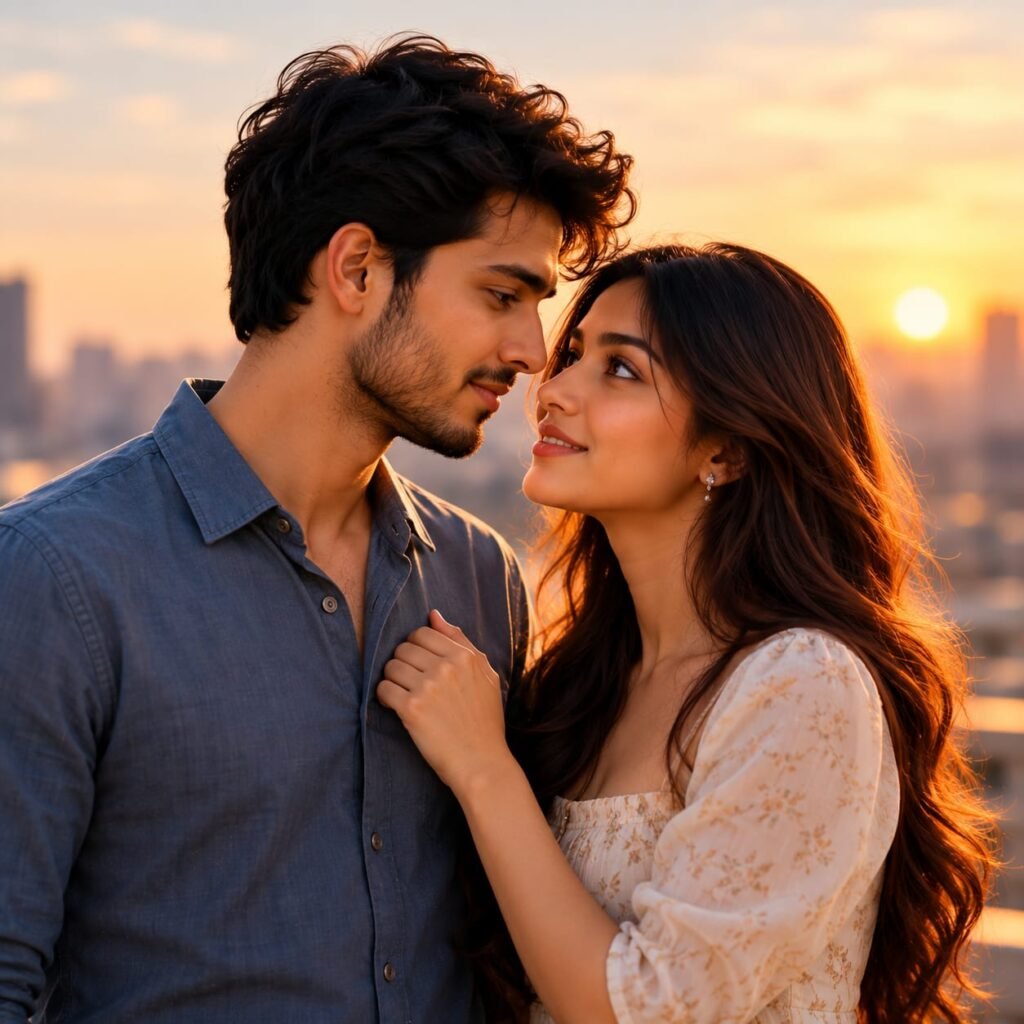
Create a beautiful, romantic portrait with this Romantic Couple Sunset AI Photo Prompt. This cinematic photography style features a stylish young couple sharing a tender moment against a glowing city skyline during golden hour. The man wears a blue button-up shirt, while the woman wears a delicate white floral dress with flowing, dark brown hair. Their loving eye contact, gentle smiles, and natural closeness create an emotional and elegant atmosphere. The warm orange sunlight, softly blurred buildings, and golden highlights add depth and a dreamy aesthetic to the image. If you love romantic couple photography, Pinterest-inspired love portraits, or cinematic sunset pictures, this AI photo prompt can help you create a similar visual style. Use it with your preferred AI image generator to experiment with beautiful couple portraits for Instagram, profile pictures, and creative photography projects.
AI Photo Prompt
Create an ultra-realistic romantic portrait of a beautiful young adult couple standing close together on a rooftop overlooking a modern city during golden hour. The man has thick, naturally wavy dark brown hair, a neatly trimmed beard, realistic skin texture, and a gentle, affectionate expression. He wears a stylish dark blue button-up shirt with the top buttons casually open and natural fabric folds. The woman has long, flowing dark brown hair with soft waves and subtle chestnut highlights illuminated by the sunset. She has expressive brown eyes, natural eyebrows, soft pink lips, delicate earrings, and a warm, loving smile. She wears an elegant white dress with a subtle beige floral pattern, a square neckline, and soft puff sleeves. She stands close to the man, gently holding the front of his shirt with one hand while looking into his eyes. The man looks down toward her with a tender expression, creating a natural and emotionally intimate moment. In the background, a softly blurred metropolitan skyline stretches across the horizon, with distant skyscrapers silhouetted against a glowing orange, peach, and golden sky. The setting sun creates warm rim lighting around their hair and shoulders, highlighting individual hair strands and adding a beautiful golden glow to their faces. Use realistic skin pores, accurate facial proportions, detailed clothing textures, natural hand positioning, subtle shadows, and cinematic colour grading. Composition: intimate chest-up couple portrait, both subjects positioned close together, faces near each other, woman’s face tilted upward, man’s face turned slightly downward, shallow depth of field, softly blurred city background. Photography style: premium romantic editorial photography, professional DSLR quality, 85mm portrait lens, f/1.8 aperture, natural golden-hour lighting, photorealistic details, high dynamic range, warm cinematic tones, vertical 4:5 composition. No text, no logo, no watermark, no artificial skin smoothing, no exaggerated facial features, no distorted hands, no extra fingers, no unnatural hair, no oversaturated colours.
How to Create This Look
- Choose an AI image generator: Open your preferred AI image generation tool.
- Copy the complete AI prompt: Paste the entire prompt into the image generator.
- Select the aspect ratio: Choose a vertical 4:5 ratio for a portrait similar to the reference image.
- Describe the couple: Include natural facial features, affectionate expressions, and gentle eye contact.
- Set the outfits: Use a dark blue button-up shirt for the man and a white floral dress for the woman.
- Add romantic lighting: Specify golden-hour sunlight, warm highlights, and soft shadows.
- Create the background: Include a modern city skyline with a softly blurred sunset.
- Generate multiple variations: Compare facial details, expressions, hand positioning, clothing, and lighting.
- Download and optimize: Save the best result in high quality and resize it according to your website requirements.
What Makes This Prompt Work
The beauty of this romantic couple portrait comes from the combination of natural expressions, coordinated clothing, and warm cinematic lighting.
Golden-hour lighting: Warm sunset light creates a soft glow around the couple’s hair and faces, giving the portrait a dreamy appearance.
Natural romantic expressions: Gentle smiles and affectionate eye contact communicate warmth without making the pose look artificial.
Coordinated outfits: The man’s dark blue shirt contrasts beautifully with the woman’s white floral dress, creating a balanced colour palette.
Flowing hair details: Describing individual hair strands and subtle highlights helps create a more realistic and visually appealing portrait.
Soft city background: The blurred skyline adds an urban atmosphere while keeping attention on the couple.
Shallow depth of field: A softly blurred background creates separation between the subjects and their surroundings.
Intimate composition: Positioning the couple close together creates an emotional connection and gives the image a professional romantic photography style.
Combining these details gives the AI image generator clear creative direction for producing an attractive, realistic couple portrait.
Best Uses
- Instagram couple posts: Create romantic portraits for social media feeds and stories.
- Pinterest inspiration: Design aesthetic couple photography pins.
- Couple profile pictures: Generate matching or romantic profile images.
- Anniversary posts: Create warm, cinematic visuals for celebrating special occasions.
- Pre-wedding inspiration: Explore romantic portrait concepts and sunset photography styles.
- AI photography portfolios: Showcase realistic couple portrait generation.
- Love story content: Create visuals for romantic storytelling and creative projects.
- Blog featured images: Use relevant, properly optimized images for photography and AI prompt articles.
Create a Beautiful Romantic Couple Portrait with AI
A Romantic Couple Sunset AI Photo Prompt is a creative way to generate realistic couple portraits featuring affectionate expressions, elegant outfits, and cinematic golden-hour lighting. This photography style combines a romantic pose with a softly blurred city skyline and warm sunset colours to create an emotional and visually appealing image.
If you enjoy aesthetic couple photography, romantic portraits, and AI-generated images, this prompt provides a useful starting point. You can use it to create visuals for Instagram, Pinterest, photography portfolios, and personal creative projects.
Why Choose a Romantic Couple Sunset AI Photo Prompt?
Sunset photography is popular because warm natural light creates depth, soft highlights, and an inviting atmosphere. When combined with a couple’s natural expressions, it can produce a portrait that feels intimate and cinematic.
This romantic couple sunset portrait prompt focuses on a man wearing a dark blue shirt and a woman wearing a white floral dress. Their coordinated outfits create a balanced colour palette, while their close positioning and gentle eye contact establish a natural romantic mood.
The prompt also describes flowing hair, realistic skin texture, and a blurred metropolitan background. These details help guide the AI image generator toward a polished result inspired by professional couple photography.
How to Get Better AI Couple Portraits
Start by copying the complete AI prompt into your preferred image generator. Select a vertical 4:5 aspect ratio and generate several variations.
If the expressions appear unnatural, request gentle smiles, realistic eye contact, and relaxed facial muscles. If the hands look distorted, specify natural finger positioning and a gentle grip on the shirt.
For better lighting, describe warm golden-hour sunlight, soft shadows, and subtle highlights around the subjects’ hair. Keep the background slightly blurred to maintain attention on the couple.
You can also experiment with different outfits, rooftop locations, garden settings, or beach sunsets to create a distinctive romantic style.
Where Can You Use These AI Couple Portraits?
These portraits work well for Instagram posts, Pinterest inspiration, anniversary visuals, romantic storytelling, and relevant photography blog articles. They can also help creators explore different couple photography concepts without arranging a physical photoshoot.
For website publishing, use a descriptive image filename and relevant alt text. Compress the image while maintaining good visual quality, and ensure its dimensions match your website layout.
Create Your Own Romantic Photography Style
The best results come from experimenting with expressions, lighting, clothing, and composition. Use this Romantic Couple Sunset AI Photo Prompt as a starting point, then adjust the details to match your preferred aesthetic.
Whether you prefer warm rooftop sunsets, soft romantic expressions, or cinematic city backgrounds, this prompt can help you explore the possibilities of AI-generated couple photography.
FAQs
1. What is a Romantic Couple Sunset AI Photo Prompt?
It is a text description used with an AI image generator to create a romantic couple portrait featuring sunset lighting, natural expressions, and an attractive background.
2. How can I create a realistic romantic couple portrait?
Copy the complete AI prompt into your preferred image generator. Include realistic facial features, natural expressions, coordinated outfits, golden-hour lighting, and a softly blurred background.
3. Which aspect ratio is best for romantic couple portraits?
A vertical 4:5 aspect ratio works well for social media portraits and aesthetic photography. You can select another ratio depending on your website layout or intended use.
4. Can I customize this romantic couple AI prompt?
Yes. You can change the outfits, hairstyles, background, poses, lighting, and camera angle to create different romantic portrait styles.
5. How can I make an AI couple portrait look natural?
Use specific instructions for realistic skin texture, natural facial expressions, accurate hand positioning, detailed hair, and balanced lighting. Generate several variations and select the most realistic result.
6. Can I use AI-generated romantic couple portraits commercially?
Commercial use depends on the AI image generator’s terms, the image content, and applicable rights. Check the relevant terms before using an image commercially.
7. What background works best for a sunset couple portrait?
A rooftop overlooking a city, a beach at sunset, or a garden during golden hour can work well. Warm lighting and a softly blurred background help create a cinematic appearance.