Intro
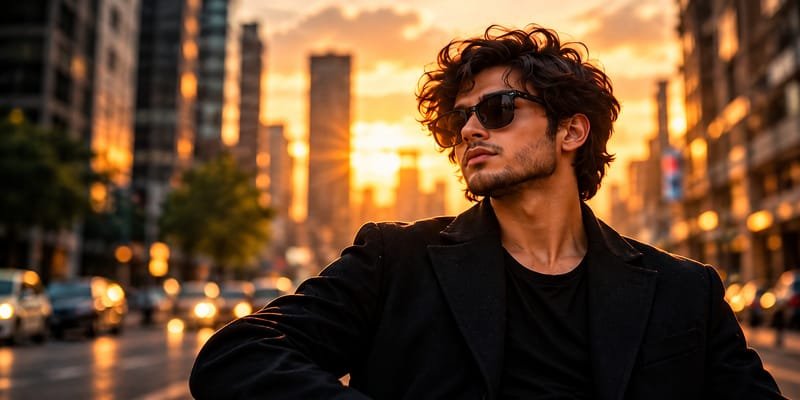
Create a stylish, ultra-realistic male portrait with this cinematic sunset portrait AI photo prompt. This look features natural wavy hair, black sunglasses, a premium black outfit, and a beautiful golden-hour city background. Moreover, the warm lighting and blurred city lights create a professional fashion photography effect. Use this prompt to generate eye-catching AI portraits for Instagram, Pinterest, personal branding, and creative projects.
AI Photo Prompts
Create an ultra-realistic cinematic portrait of a fashionable young adult man standing on a modern city street during a breathtaking golden-hour sunset. He has thick, naturally wavy dark brown hair, a neatly trimmed beard, a defined jawline, and stylish black sunglasses. He wears a premium black blazer over a simple black crew-neck T-shirt, creating a sophisticated and minimal urban fashion look. His head is slightly turned toward the side as he confidently looks at the glowing city skyline. Warm golden sunlight illuminates his face and hair, creating a natural rim-light effect. In the background, tall modern buildings, distant cars, softly blurred trees, and glowing streetlights create a cinematic urban atmosphere. Use realistic skin texture, natural facial proportions, detailed hair strands, soft shadows, rich black clothing, warm amber tones, shallow depth of field, professional DSLR photography, an 85mm portrait lens, f/1.8 aperture, high dynamic range, balanced contrast, premium fashion editorial styling, and cinematic color grading. Keep the subject sharp while the city background remains softly blurred. Horizontal composition, waist-up framing, natural body proportions, photorealistic details, 2:1 aspect ratio, 800×400 pixels. No text, no logo, no watermark, no cartoon effects, and no distorted facial features.
How to Create This Look
- Choose an AI image generator that supports realistic portrait photography.
- Copy the complete AI photo prompt and paste it into the prompt box.
- Select a photorealistic or cinematic photography style.
- Set the aspect ratio to 2:1 for a horizontal image.
- Generate several variations and choose the most realistic result.
- Adjust the warmth, contrast, and highlights to enhance the golden-hour effect.
- Finally, export the image in WebP format at 800×400 pixels for your website.
What Makes This Prompt Work
Golden-hour lighting: Warm sunset light creates a natural glow and adds depth to the portrait.
Realistic facial details: Specific instructions for skin texture, hair, and facial proportions help guide the AI toward a lifelike result.
Premium black outfit: A black blazer and T-shirt create a clean, modern, and sophisticated appearance.
Cinematic city background: Tall buildings and glowing streetlights add an urban atmosphere without distracting from the subject.
Shallow depth of field: A softly blurred background keeps attention on the main subject.
Professional composition: Horizontal framing makes the image suitable for website banners, blog images, and photography inspiration.
Best Uses
- Instagram portraits and fashion posts
- Stylish male profile pictures
- AI photography websites and blogs
- Pinterest fashion inspiration
- Personal branding and creator portfolios
- Men’s fashion and lifestyle websites
- Website hero images and blog banners
- Cinematic portrait collections
Create a Cinematic Sunset Portrait with AI
A cinematic sunset portrait is an excellent choice for anyone who loves modern fashion photography and realistic AI-generated images. With this cinematic sunset portrait AI photo prompt, you can create a stylish male portrait featuring warm lighting, a sophisticated black outfit, and a beautiful urban background.
The best part is that you do not need an expensive camera or a professional photography studio. Instead, you can use an AI image generator to experiment with different styles and create your desired look.
Why Choose This Cinematic Sunset Portrait AI Photo Prompt?
Golden-hour lighting is popular in portrait photography because it creates soft highlights and warm colors. In this image, the setting sun illuminates the subject’s hair and face, giving the portrait a natural cinematic appearance.
Additionally, the black blazer and crew-neck T-shirt create a timeless fashion look. The sunglasses add a modern touch, while the slightly turned head gives the portrait a confident and relaxed appearance.
The city background also makes a difference. Tall buildings, distant vehicles, and glowing streetlights create depth. Meanwhile, the soft background blur keeps the focus on the subject.
How to Create Realistic AI Male Portraits
To achieve better results, describe the subject, outfit, lighting, background, and photography style clearly. For example, include details such as natural skin texture, realistic hair strands, soft shadows, and shallow depth of field.
Furthermore, experiment with different lighting conditions and camera angles. You can try a rooftop sunset, a busy city street, or a modern architectural background. However, keep the main subject clearly defined to maintain a professional appearance.
Best Ways to Use AI Portrait Images
This cinematic male portrait prompt works well for Instagram, Pinterest, fashion blogs, and personal branding. It can also be used to create visual content for AI photography websites.
For website publishing, resize the image to 800×400 pixels and compress it before uploading. Additionally, use a descriptive file name and relevant alt text to help search engines understand the image.
Tips for Better SEO Results
Publishing a useful AI photo prompt can help attract people searching for portrait inspiration. However, ranking on Google requires more than adding keywords.
Therefore, write original content, answer users’ questions, organize the article with descriptive subheadings, and link to relevant pages on your website. Also, make sure the page loads quickly and works well on mobile devices.
Finally, use the prompt to create several portrait variations and share the most useful results. Helpful content and a good user experience can support your long-term SEO strategy, although no specific ranking is guaranteed.
FAQs
1. What is a cinematic sunset portrait AI photo prompt?
It is a text instruction that guides an AI image generator to create a portrait with cinematic lighting, warm sunset colors, and a stylish urban background.
2. How can I create a realistic male portrait using AI?
Choose an AI image generator, enter a detailed prompt, select a realistic photography style, and generate several variations.
3. Which lighting is best for cinematic portraits?
Golden-hour lighting works well because it produces warm highlights, soft shadows, and a visually appealing atmosphere.
4. Can I use this AI photo prompt for Instagram?
Yes. You can adapt the prompt for Instagram posts, profile pictures, fashion content, and personal branding.
5. What image size is suitable for a website?
An 800×400-pixel image is suitable for many horizontal blog images. However, check your website layout to ensure the image displays correctly.
6. How can I improve the realism of AI-generated portraits?
Describe natural skin texture, realistic hair, accurate facial proportions, and balanced lighting. You can also use a reference photo if your chosen AI tool supports it.
7. Can this AI photo prompt help my website rank on Google?
It can support useful, relevant content for your target audience. However, rankings depend on several factors, including content quality, search intent, competition, website performance, and overall SEO.