Intro
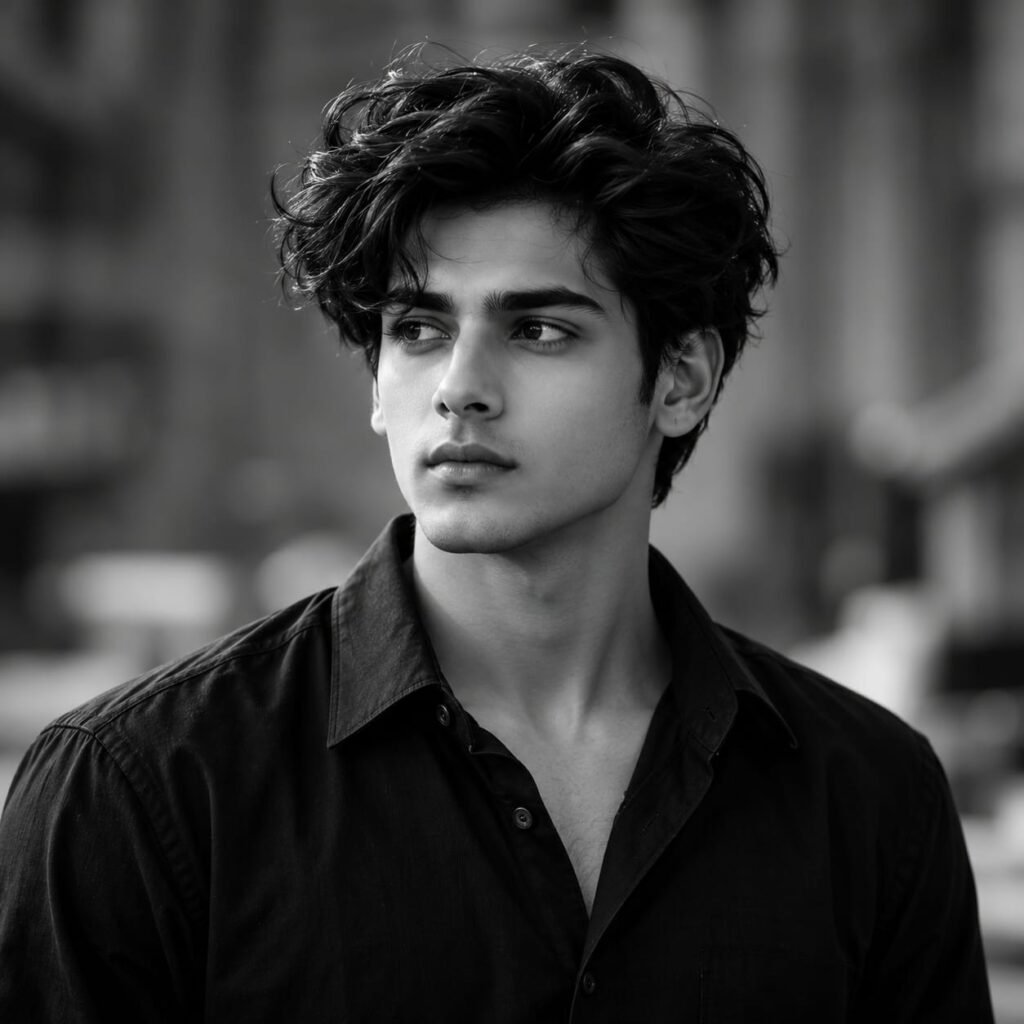
Create a striking monochrome portrait with this Black and White Boy AI Photo Prompt. This timeless photography style features a handsome young man with thick, naturally wavy black hair, well-defined facial features, and a calm, confident expression. He wears a classic black button-up shirt with an open collar, creating a sophisticated and effortlessly stylish appearance. The soft, blurred background, dramatic grayscale tones, and balanced lighting give the image a cinematic editorial feel. The contrast between the dark clothing and the lighter facial highlights adds depth, while the natural hairstyle creates an attractive, modern aesthetic. If you love black-and-white photography, men’s fashion portraits, moody Instagram pictures, or minimalist photography, this AI photo prompt can help you create a similar visual style. Use it with your preferred AI image generator to experiment with realistic monochrome portraits for social media, profile pictures, and creative photography projects.
AI Photo Prompts
Create an ultra-realistic black-and-white editorial portrait of a stylish young adult man with thick, voluminous, naturally wavy black hair, well-defined eyebrows, deep-set expressive eyes, a straight nose, a sculpted jawline, and naturally textured skin. He has a clean-shaven face with subtle natural facial definition and a calm, thoughtful expression. His head is turned slightly to the left as he looks into the distance, creating a sophisticated and contemplative mood. He wears a classic black button-up shirt with a relaxed open collar, subtle fabric texture, realistic folds, and a timeless minimalist design. His shoulders are relaxed, and his posture is natural and confident. Use a completely monochrome black-and-white colour palette with rich black shadows, soft gray midtones, luminous facial highlights, and carefully balanced contrast. The background features a softly blurred urban or architectural setting with indistinct shapes and smooth tonal transitions, creating depth without distracting from the subject. Soft directional light illuminates one side of his face, emphasizing his cheekbones, jawline, nose, and individual hair strands, while gentle shadows add dimension to the opposite side. Include realistic skin pores, detailed wavy hair, natural eye reflections, authentic shirt fabric, accurate facial proportions, and subtle film-grain texture. Composition: chest-up portrait, subject positioned near the center, head slightly turned toward the left, face in sharp focus, shoulders visible, shallow depth of field, softly blurred background. Photography style: premium black-and-white fashion editorial, fine-art portrait photography, 85mm portrait lens, f/1.8 aperture, professional DSLR quality, realistic grayscale tonal range, cinematic lighting, subtle analog film aesthetic, high detail, vertical 4:5 composition. No colour, no text, no logo, no watermark, no plastic-looking skin, no exaggerated facial features, no distorted eyes, no unnatural hair, no excessive sharpening.
How to Create This Look
- Choose an AI image generator: Open your preferred AI image generation tool.
- Copy the complete AI prompt: Paste the entire prompt into the image generator.
- Select the aspect ratio: Choose a vertical 4:5 ratio for a portrait similar to the reference image.
- Describe the hairstyle: Specify thick, voluminous, naturally wavy black hair with realistic individual strands.
- Set the outfit: Use a classic black button-up shirt with a relaxed open collar.
- Choose the expression: Request a calm, thoughtful expression with the subject looking slightly to the side.
- Apply monochrome styling: Specify a true black-and-white palette with rich shadows and soft gray midtones.
- Adjust the lighting: Use soft directional lighting to highlight the face and create natural shadows.
- Generate multiple variations: Compare the facial details, hairstyle, contrast, and overall composition.
- Download and optimize: Save the best result in high quality and resize it according to your website requirements.
What Makes This Prompt Work
The appeal of this monochrome portrait comes from the combination of classic styling, expressive facial details, and carefully controlled lighting.
Black-and-white colour grading: Grayscale tones create a timeless aesthetic and emphasize facial structure without the distraction of colour.
Voluminous wavy hair: Detailed hair texture adds depth and gives the portrait a natural, modern appearance.
Classic black shirt: Minimalist clothing keeps attention on the face and complements the monochrome style.
Directional lighting: Soft highlights and shadows emphasize the jawline, cheekbones, and natural facial contours.
Thoughtful expression: A slightly turned head and distant gaze create a cinematic, contemplative mood.
Shallow depth of field: A blurred background separates the subject from the surroundings and creates a professional photography effect.
Balanced tonal contrast: Rich blacks, soft grays, and lighter facial highlights help preserve detail throughout the portrait.
Best Uses
- Instagram portraits: Create stylish monochrome pictures for your social media feed.
- Pinterest inspiration: Design black-and-white photography pins with a minimalist aesthetic.
- Profile pictures: Generate sophisticated portraits for social media profiles.
- Men’s fashion content: Showcase classic black outfits and modern hairstyles.
- Photography portfolios: Display realistic monochrome portrait styles.
- YouTube thumbnails: Create dramatic portrait visuals for lifestyle and fashion content.
- Creative branding: Develop minimalist visual concepts for personal projects.
- Blog featured images: Use relevant, properly optimized images for photography and AI prompt articles.
Create a Stylish Monochrome Portrait with AI
Black-and-white photography remains popular because it emphasizes facial expressions, textures, shadows, and composition. Removing colour allows viewers to focus on the subject’s features and the overall mood of the image.
This monochrome male portrait AI prompt focuses on thick, wavy black hair, a classic black button-up shirt, and a thoughtful side-facing gaze. These elements create a minimalist appearance that works well for modern fashion photography.
The prompt also describes directional lighting, realistic skin texture, and a softly blurred background. These details guide the AI image generator toward a polished portrait inspired by professional editorial photography.
How to Get Better AI Black-and-White Portraits
Start by copying the complete AI prompt into your preferred image generator. Select a vertical 4:5 aspect ratio and generate several variations.
If the image looks too dark, request balanced exposure and more detail in the shadows. If the face appears artificial, specify realistic skin texture, natural facial proportions, and subtle highlights.
For a stronger monochrome effect, describe rich blacks, soft gray midtones, and bright but controlled facial highlights. Keep the background blurred so the subject remains the main focus.
You can also experiment with different hairstyles, shirt styles, camera angles, and lighting directions to create unique portrait variations.
Where Can You Use These AI Portraits?
These portraits work well for Instagram content, Pinterest boards, profile pictures, men’s fashion inspiration, AI photography portfolios, and relevant blog articles. They can also help creators explore different monochrome photography concepts without arranging a physical photoshoot.
For website publishing, choose a descriptive image filename and add relevant alt text. Compress the image while maintaining good visual quality, and ensure its dimensions match your website layout.
Create Your Own Monochrome Photography Style
The best results come from experimenting with lighting, composition, hairstyles, and contrast. Use this Black and White Boy AI Photo Prompt as a starting point, then adjust the details to match your preferred aesthetic.
Whether you prefer dramatic shadows, soft grayscale tones, or minimalist fashion portraits, this prompt can help you explore the possibilities of AI-generated monochrome photography.
FAQs
1. What is a Black and White Boy AI Photo Prompt?
It is a text description used with an AI image generator to create a male portrait featuring grayscale tones, realistic facial details, and classic fashion styling.
2. How can I create a realistic black-and-white male portrait?
Copy the complete AI prompt into your preferred image generator. Describe the hairstyle, clothing, facial expression, lighting, grayscale tones, and background in detail.
3. Which aspect ratio is best for a monochrome portrait?
A vertical 4:5 aspect ratio works well for portrait photography and social media posts. You can select another ratio depending on your website layout or intended use.
4. Can I customize this black-and-white boy AI prompt?
Yes. You can change the hairstyle, outfit, expression, background, lighting direction, and camera angle to create different monochrome portrait styles.
5. How can I make a black-and-white AI portrait look professional?
Use detailed instructions for directional lighting, realistic skin texture, balanced grayscale tones, natural facial proportions, and a softly blurred background.
6. Can I use AI-generated monochrome portraits commercially?
Commercial use depends on the AI image generator’s terms, the generated image, and any applicable rights. Review the relevant terms before using images commercially.
7. What clothing works best for a black-and-white male portrait?
A black button-up shirt, dark jacket, or simple white shirt can work well. Minimalist clothing helps keep attention on facial features and lighting.