Intro
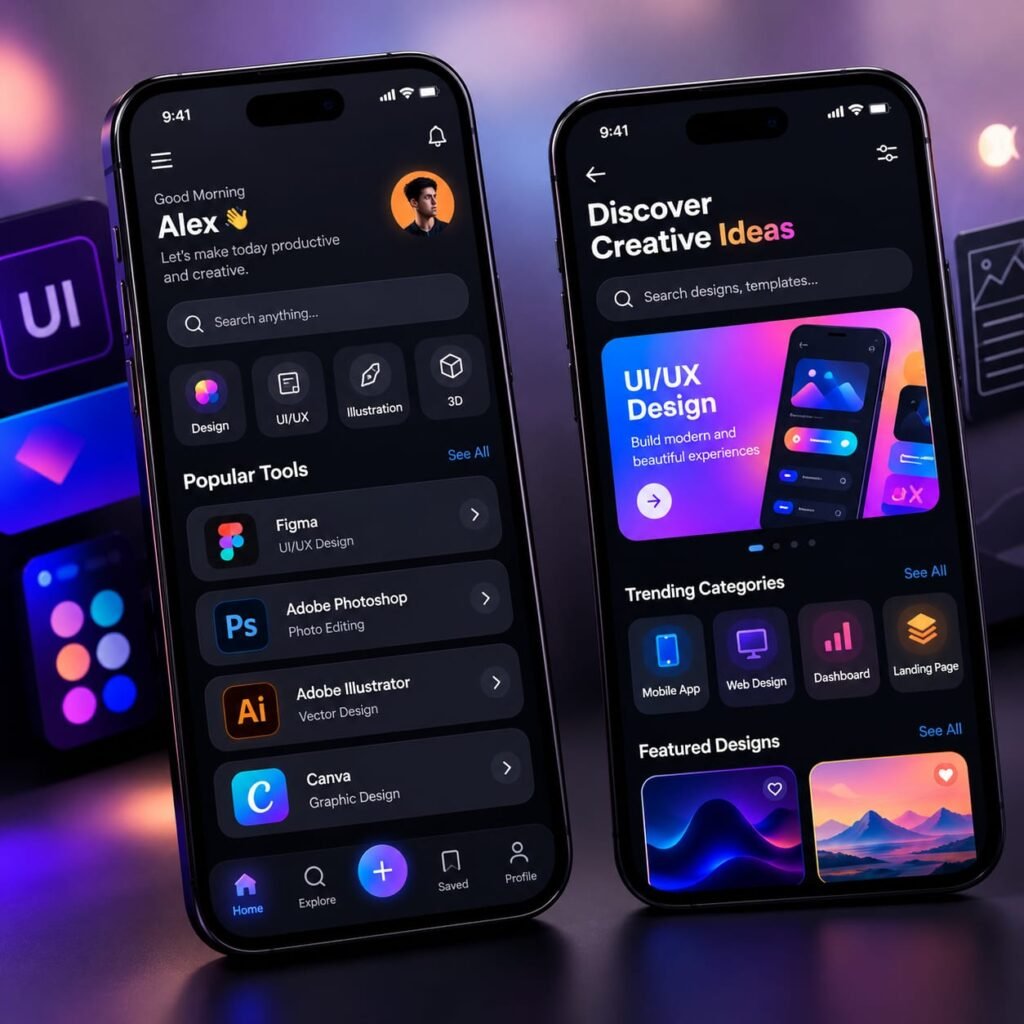
A great mobile app design should look beautiful and feel easy to use. This modern UI UX design app concept showcases a premium creative platform with stylish dark-mode screens, colorful gradients, and well-organized design tools. The interface features two smartphone screens displaying a creative dashboard, popular design software, trending categories, and inspiring visual projects. Moreover, its vibrant purple and blue lighting gives the entire concept a futuristic appearance. If you love mobile app design, UI/UX inspiration, or creative technology, this AI photo prompt is perfect for exploring modern interface ideas.
AI Prompt
Create an ultra-realistic cinematic 3D product presentation featuring two premium modern smartphones standing upright on a dark reflective surface, both displaying a beautifully designed creative mobile application interface, the first smartphone showing a personalized home dashboard with a welcome message, profile avatar, search bar, colorful design category icons, popular creative tools, and clean bottom navigation, the second smartphone displaying a discovery page with a bold creative headline, search functionality, vibrant UI/UX design promotional banner, trending categories, and featured design cards, elegant dark mode interface, sophisticated black backgrounds, smooth rounded cards, electric blue, purple, pink, and orange gradient accents, modern typography, intuitive navigation, perfectly aligned UI elements, realistic glass reflections, premium smartphone materials, dramatic studio lighting, soft purple and blue ambient glow, blurred futuristic creative studio background, professional app showcase photography, sharp details, realistic shadows, high-end technology advertising aesthetic, balanced composition, no logo, no brand name, no website name, no watermark.
How to Create This Look
- Start with a modern smartphone mockup featuring two mobile screens.
- Select a premium dark-mode interface.
- Use purple, blue, pink, and orange gradient accents.
- Create a clean dashboard with search and navigation elements.
- Add creative categories and featured design cards.
- Use rounded corners and consistent spacing.
- Add cinematic lighting and realistic reflections.
- Generate the final concept using an AI image generator.
What Makes This Prompt Work
- Dark Mode Design: Creates a premium and modern appearance.
- Vibrant Gradients: Adds energy and visual attraction.
- Clean Layout: Makes the mobile interface easy to understand.
- Dual Smartphone Display: Shows different app screens in one composition.
- Realistic Lighting: Gives the presentation a professional 3D appearance.
- Modern UI Elements: Search bars, cards, icons, and navigation improve the overall design.
Best Uses
- Mobile app design inspiration
- UI/UX designer portfolios
- Creative agency websites
- App development presentations
- Technology and startup advertisements
- Dribbble and Behance design concepts
- Social media promotional graphics
Explore a Modern UI UX Design App Concept
A modern UI UX design app should combine attractive visuals with a smooth user experience. The right interface makes an application easier to understand, navigate, and enjoy. This creative mobile app concept demonstrates how thoughtful design can transform a simple application into a premium digital experience.
The design features two smartphones with different application screens. One screen displays a personalized dashboard with creative tools and popular design categories. Meanwhile, the second screen highlights a discovery page with featured projects, trending categories, and colorful promotional content.
What Makes This Mobile App Interface Special?
The biggest attraction is its premium dark-mode appearance. The black background creates a strong contrast with vibrant purple, blue, pink, and orange gradients. As a result, important interface elements become more noticeable.
Additionally, the rounded cards, clean typography, and organized navigation create a balanced layout. Every section has a clear purpose. This makes the overall interface look modern without feeling overcrowded.
The dual-screen presentation is another interesting detail. It shows how different sections of the same application can work together while maintaining a consistent visual style.
Create Similar UI UX Designs with AI
AI image generators can help designers explore fresh mobile application concepts. You can experiment with different layouts, color combinations, dashboard styles, and navigation elements.
Start by describing the smartphone screens, interface structure, preferred colors, and lighting effects. Then, use the complete AI prompt above to generate your own creative concept.
You can also try light-mode interfaces, minimal layouts, or futuristic dashboard designs. However, always focus on readability and visual consistency.
Why Is UI UX Design Important?
Good UI/UX design improves the way people interact with digital products. A visually attractive interface can capture attention, but an intuitive experience encourages users to explore further.
Whether you are creating a portfolio, presenting an app concept, or developing a creative project, this modern UI UX design app is a useful source of inspiration.
Use these ideas to explore new design possibilities and create mobile interfaces that look professional, feel intuitive, and deliver a better user experience.
FAQs
1. What is a modern UI UX design app?
A modern UI UX design app is a mobile application concept that combines attractive visual elements with simple navigation and a user-friendly experience.
2. What is dark mode in mobile app design?
Dark mode uses dark backgrounds with contrasting text and interface elements. It creates a modern appearance and can improve visual comfort in certain lighting conditions.
3. Which colors work best for modern UI UX design?
Purple, blue, pink, and orange gradients are popular choices for creative interfaces. However, the best colors depend on the brand identity and purpose of the application.
4. Can AI generate mobile app UI designs?
Yes. AI image generators can create visual concepts of mobile interfaces, dashboards, smartphone mockups, and creative app layouts.
5. Where can I use this UI UX design inspiration?
You can use it for design portfolios, creative presentations, app concept showcases, website graphics, and social media posts.